How I use Obsidian across Claude Code and other AI tools
I use Obsidian to collect the output of Claude Code and other AI tools to feed as input in new chats to save time and improve AI memory in a learning loop.
A few months ago as I worked to reduce my AI coding agents' hallucinations, I had a growing realization that I needed to improve my context management. Not just within a single session, but across all of them. I was learning things in one tool that would've been useful in another, and there was no mechanism to transfer that knowledge besides my own memory and copy-paste.
I eventually landed on using Obsidian as a central hub of long-term memories across my AI coding tools. This article describes the usability problems in the tools I was using, so you can understand how I think about it, and how I think about the non-technical problems that surround the software development lifecycle.
There has been wide discussion about this over the past few months. Some people call this a "memory architecture". Andrej Karpathy described how he uses Obsidian to create his LLM Knowledge Bases.
Since going deeper into vibe coding, I had been doing a blend of coding, researching tools, and general planning. Some of my AI conversations were incredibly useful, and I wanted to keep those insights somewhere I could actually use them again. I realized this was the "manual slinging of prompts" that Gene Kim and Steve Yegge suggest optimizing in the world of AI, except I wasn't just slinging prompts. I was slinging context.
I use multiple AI tools, across multiple interfaces (CLI, web, mobile, desktop), for widely different things: engineering, research, business planning, writing, daily life. It's important to use the best tool for the job. But they don't talk to one another. I was accumulating knowledge and didn't have a lightweight way to reuse it.
Sidebar: when I refer to context management in this article, I'm also thinking about practices for "personal note-taking" and "engineering documentation". Each has its function, but there's a lot of overlap. You can learn more about context engineering in the article I linked above about reducing hallucinations.
I wanted to feed AI output as input into the next chat session
Stated plainly: I wanted to pull key findings out of AI conversations, export long chats into clean summaries, enrich and transform artifacts across tools, and make all of it easily referenceable later.
Sometimes I want tools to share context. Other times I want them isolated so they don't go deleting random things. I also don't want my coding agent mixing notes from my daily life and my engineering so that unrelated context seeps into a code review. But I need a mechanism for me to control when they interact.
And I wanted whatever this mechanism was to be lightweight: drag-and-drop into a browser, easy editing on mobile, programmatic processing in the terminal.
Usability challenges when sharing context across AI tools
AI coding tools already solve this for code. Cursor and Claude Code read and write files. If the thing I want to remember is code, I'm set. But a lot of what I learn from AI sessions isn't code. It's research into new tooling or feature ideas, decisions about architecture, patterns I want to remember, preferences for how I want things structured. None of that belongs in a codebase.
Google Gemini's Deep Research export to Drive. This is genuinely cool. You run a deep research session and it lands in your Google Drive as a doc. But I needed something that wasn't locked to one AI's ecosystem. If I export to Drive, I still can't easily feed that into Claude Code or Cursor without copying it out, reformatting it, and pasting it somewhere else. Extra steps kill adoption.
The problem with chat search and history. Every AI tool has a chat history. None of them make it easy to find anything three weeks later. Search helps, but it doesn't solve curation. I don't want to search through 200 conversations. I want the 6 things worth keeping.
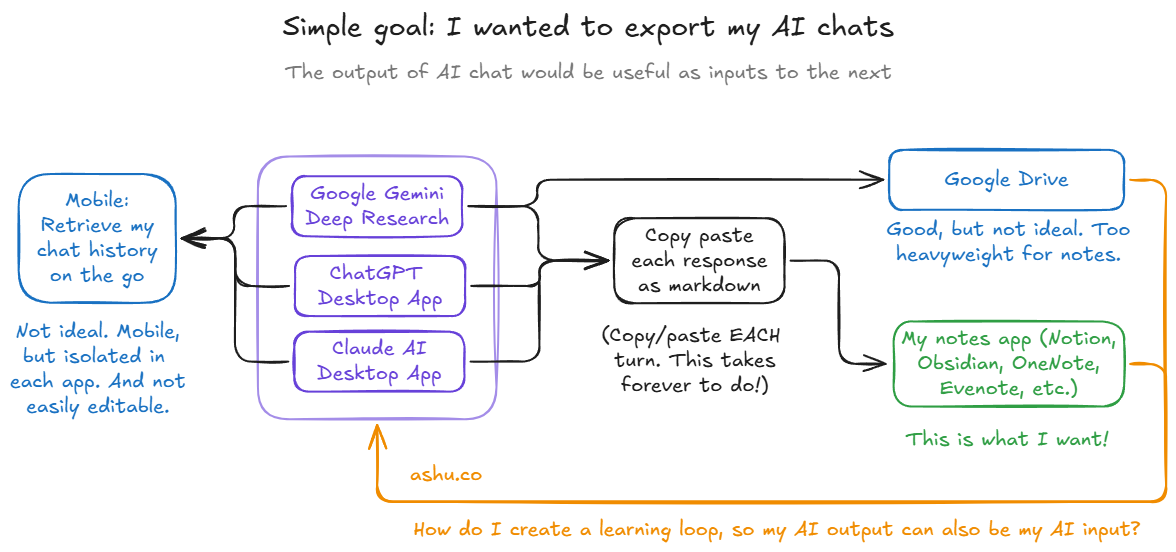
"Just use Claude Code or Cursor for everything." There's a camp of folks who are using AI coding tools for non-technical work like sales and marketing. So it is technically possible to use vibe coding tools for general purpose AI. But some tasks want a visual preview, or drag-and-drop, or a mobile screen while I'm running errands. Not everything is a terminal task.
MCP servers for Notion and JIRA. This is actually powerful. I've used MCP for read/write operations against team knowledge bases in work environments. For shared systems with structured data, it's great. But for quick personal notes, the interaction latency really feels heavyweight. I don't want to wait for an API round-trip to repeatedly export terminal output. It really adds up when you're moving quickly and iterating across multiple documents.
At some point I realized I was overcomplicating this. Files on a filesystem are easy for AI coding tools to read, easily shareable, and drag-and-drop compatible. I didn't have to wait for new plugins — or build them myself.
Why Obsidian specifically: old school files are lightweight
I remembered that a friend had been trying to get me to use Obsidian for years. I'd brushed it off as "another note-taking app." But when I actually looked at what it was (a local-first markdown editor with sync), I realized it was exactly the missing piece.
Local files mean universal compatibility. Every AI tool I use can read a markdown file. I can drag files into chat interfaces, point CLI tools at directories, or copy-paste from the editor. No export step, no API, no conversion. The file is the interface.
Sync across devices. Obsidian syncs markdown files between my laptop and my phone. I can review notes on mobile, jot something down while walking, and it's there when I sit down at my desk. This matters more than I expected, because I do a lot of thinking away from my computer, and being able to capture that in the same system I use for everything else let me replace Evernote as my note-taking tool. (Yes, I was still using Evernote in 2025!)
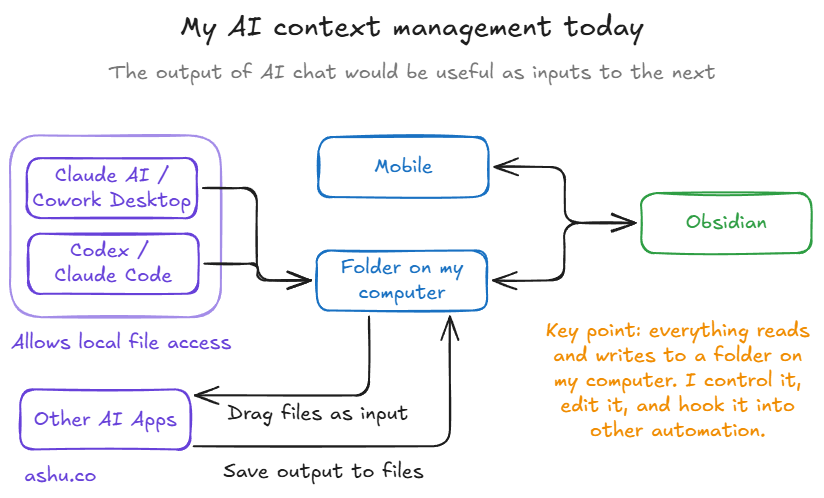
Isolation by default, sharing by choice. I was uncomfortable giving AI read/write access to my entire Google Drive. A filesystem-based approach lets me allowlist specific folders. Claude Desktop and Claude Code both support this. I control the boundary. My personal notes stay personal unless I deliberately share a specific folder.
Markdown is the lingua franca of AI tools. AI coding assistants already think in markdown. Plans, docs, summaries, rules files — it's all markdown. My notes are in the same format as the output. No translation layer. When I feed a note into an AI session, it doesn't need to parse anything special. When the AI produces something worth keeping, it's already in a format I can save directly.
Different aspects of my memory management workflow
As a long-term memory store alongside code and git history. There are things I learn that don't belong in a codebase or a commit message. Research about open source software and vendors. Interesting articles I read about new AI techniques that I'd like to try out. After working through something in ChatGPT or Gemini's web interface, I'll distill the key parts and save them where Claude Code, Cursor, or Codex can find them later.
Exporting good conversations. AI chats regularly surface something worth keeping — a novel approach, a well-structured analysis, a decision framework. When this happens, I often want to pull the key parts into a markdown note. This is the curation step that chat history search can't help with, especially when I want to mix and match the data with other sources (see "input/output hub" below).
Reusable prompts. Some prompts are too nuanced to keep in my head and too context-dependent to turn into a script. They live as markdown files I can grab when I need them. I have prompts for code review, for research synthesis, for writing in a specific style. They're not one-size-fits-all — they're the prompts that work for my workflow, refined over time.
As an input/output hub. I write notes, feed them to an AI tool, the tool enriches or transforms them, and I save the output back as a new version. The vault becomes a working memory that accumulates over time. My blogging workflow runs almost entirely this way: outlines become drafts, drafts get reviewed and iterated, and the whole history lives in the vault. I want to mix AI chat exports, research call notes, screenshots, and PDFs of research I want to use as input.
Full circle: shifting some gravity back to the local filesystem
After 15+ years of using cloud web apps for everything, I've come back to files on a local filesystem for my note-taking. Why did I want to write about this workflow as I post about coding in the modern world, especially considering I'm talking about a lot of non-technical work? There is a lot of non-technical work in a typical software engineer's week, and automating the work that surrounds engineering will help avoid bottlenecks from slowing down AI-driven work.
I'm still evolving how I use this. If you're juggling multiple AI tools and feel like you're losing good work to chat history graveyards, I'd be curious how you're handling it. What's your system for keeping the good stuff from AI conversations? Let me know; DM me on LinkedIn.