How I got to 3 parallel Claude Code agents + past 16% utilization
I was stuck at 16% Claude Code utilization. Here's how I set up 3 parallel coding agents working on separate projects using git worktrees.

At the end of my last post, I was: stuck at 16% Claude Code utilization on the Max 20x plan, and had just figured out that parallel agents could help me break past that limit, explore git worktrees, and make better use of the $200 plan I had paid for.
But I knew that git commits and conflicts would be a problem as 2 agents make the same commits in the same repository. So how do I coordinate and isolate them?
Spinning up a second (or third) agent in another terminal is easy. But keeping them productive and increasing velocity was the new challenge. I had been reading many posts about people orchestrating 10's or 100's of background agents, but I haven't read many tutorials covering the evolution from 1 to 3 agents.
Anthropic recently shipped Claude Code Agent Teams, which automates this: a lead agent coordinates teammates, assigns tasks, and synthesizes results across multiple sessions. But this is more about automated delegation of a single existing project rather than adding the ability to parallelize arbitrary new projects.
This post covers the observations, changes in my local development environment and the reasoning that took me from 16% to 50%+ utilization.
Token FOMO: how were people using 3+ Claude Code accounts?
I'll confess: I was feeling token FOMO, watching engineers post articles about their agent squads and getting 100 agents run in parallel. Meanwhile, I was stuck at 16% on a $200 / month. I didn't feel like I needed 100 agents, but I wanted to understand how to break past that to get on the path to higher output.
After the initial experiment with a second agent to consume more tokens, I realized that extra agents would be chaos: merge conflicts, inconsistent databases, agents pulling the rug out from under each other.
So, I decided to investigate how to coordinate them. This eventually took me on a journey that improved my workflow. But before I took the first step, I realized I needed to ask: would it actually increase my output?
Before adding a second agent, make sure the first is busy
It's a bit counterintuitive. It's so easy to spin up a second agent that it's also easy to miss that you're only getting value if you're able to keep both agents mostly busy. Here are a few hints to figure out where you are.
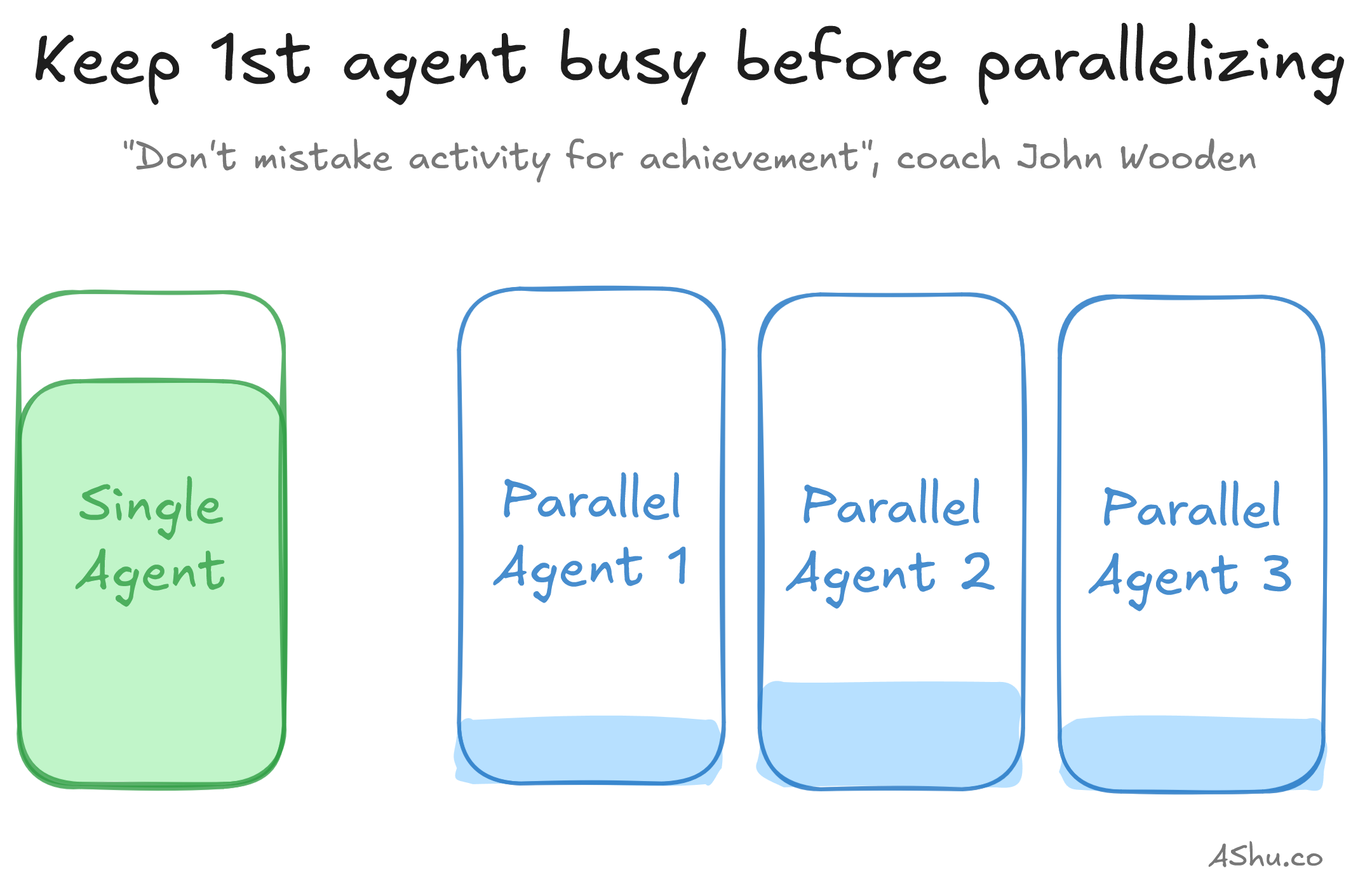
- If your agent is often waiting on you: waiting for an answer to its question or needing clarification on ambiguous tasks, it's not doing real work. You probably need a way to keep them busy better, and this is where structured markdown plan files pay off. Or the agent is waiting on you to execute some queries or deployment, maybe the problem is a tooling problem - you need to automate something and put it in the hands of the agents (if it's safe to).
- If you keep interrupting the agent to micromanage, it's effectively the same problem. It may be helpful to review the markdown plan files and get them into more agreeable state before you let the agents run.
- If your agents keep churning out work that you end up disagreeing with (despite having reasonable plans), then the workload may not be good for parallelizing. I see this often when troubleshooting complex systems or complex projects.
- If you prefer to hand-code, or you don't like context-switching between multiple agents and tasks, you have a totally valid reason not parallelize. Not every workflow benefits from more agents.
But if you're sitting idle while the agent runs—working on the next task, responding to Slack, browsing Reddit—this is the signal you can juggle another agent. Basically: if you're waiting on the agent regularly, committing and shipping regularly, then add more agents.
Two agents crammed in a repo: isolation is a problem
When you're ready for Agent 2, you become an engineering manager and face the problem of assigning useful work to your team. You need to source the work: come up with ideas, talk to people. You need to scope it so it's parallelizable and pragmatic.
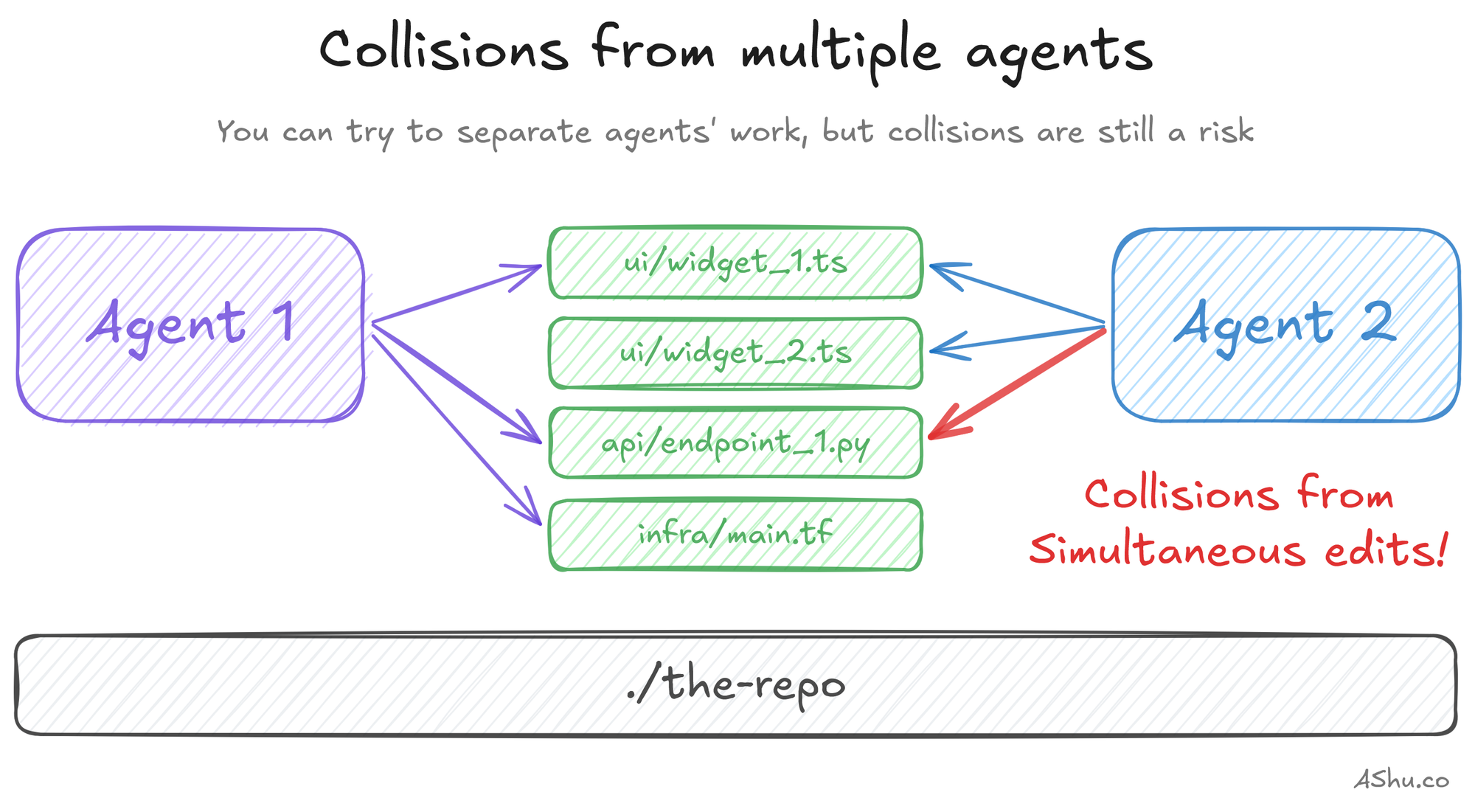
But there's a technical problem you'll face first. If two agents are touching the same files, you'll get merge conflicts, overwritten work and outdated understanding of the code. In the first few hours working with parallel coding agents, I tried to keep them productive and focusing on separate concerns in the same repository.
Here are a few methods I used to separate the agents:
- Frontend / backend split: these are often separate concerns in separate files
- Application and infrastructure code: e.g. one agent writes Typescript, and another, Terraform
- Feature pipelining: first ship feature 1 behind a feature flag, and validate it / work on corner cases while another agent starts feature 2
- Async refactoring, hardening, polishing, documentation: sometimes if I have a bit of extra bandwidth, I'll spin up an extra agent to do maintenance that avoids my main work. It's useful to accumulate maintenance tasks in a backlog for the agent to pull from.
After a few coding sessions, I realized "separation" wasn't enough: I was trying to keep agents separate through convention rather than configuration. Collision reduction wasn't enough; I needed to properly isolate them to eliminate collisions so they can be more autonomous and be faster.
And note: these agent "separation" methods may not have fully solved the "isolation" problem. But they're useful scoping / delegation approaches to fully isolated agents, too.
I also began to be aware of the kinds of workloads that required more active attention, and some kinds of workloads that ran longer. I knew that I could only handle 1 workload that required active attention, which meant the other agents needed longer projects. And having longer projects meant a bit of planning ahead.
Git worktrees: multiple coding agents in the same repo
Once you have isolated, right-sized projects, I was still running into the risk of git conflicts. Parallel coding agents are still editing files in the same directory.
Git worktrees solve this problem. Each worktree is a separate checkout of the same repository: a different folder, a different branch, but linked to the same git history and object store. They're lightweight to create, and you can have 3 agents working in the same sandbox, all contributing back to the same repo. Learn more about git worktrees.
Why Git worktrees instead of separate clones? They're a bit more lightweight because they're linked to a history of the various branches and commits. So, for example, a single git fetch makes it into all worktree directories. And commits in each worktree are known by the others.
There are a few ways to set this up:
Worktrees with git
Git worktrees are both branches and folders, so here are a few commands you can use:
# List worktrees
git worktree list

# Create a new worktree AND a new branch in 1 command
git worktree add -b <new-branch-name> <path/to/new/directory>

# Create a new worktree with an existing branch
git worktree add <path> [<branch>]

# Remove the worktree (i.e. the folder) but the branch remains
git worktree remove <path>
Built-in support in vibe coding tools
I won't elaborate here, but I'll link to the documentation:
- Cursor: Parallel Agents
- Claude Code: Run parallel Claude Code sessions with Git worktrees
- Codex: Worktrees
Note: If you want automated multi-agent coordination, check out Claude Code Agent Teams. This is useful to parallelize tasks within a single project. The worktree-based approach I describe is slightly different. You can create and control your own system of parallel agents to launch multiple, arbitrary projects. Claude Code Agent Teams lets you burn down a project's list faster, and the worktree-based approach lets you branch out to work on multiple projects.
3 parallel API servers, 3 frontend servers, 3 databases
Git worktrees went a long way, but I noticed that verifying my code was tedious. Stateless unit tests were easy, I could run them to my heart's content in each worktree. But integration tests that touched the database encountered different postgres schemas. And my local servers obviously collided on ports.
Here's what a sample web server might look like, with an API server and UI server that each have environment variables.
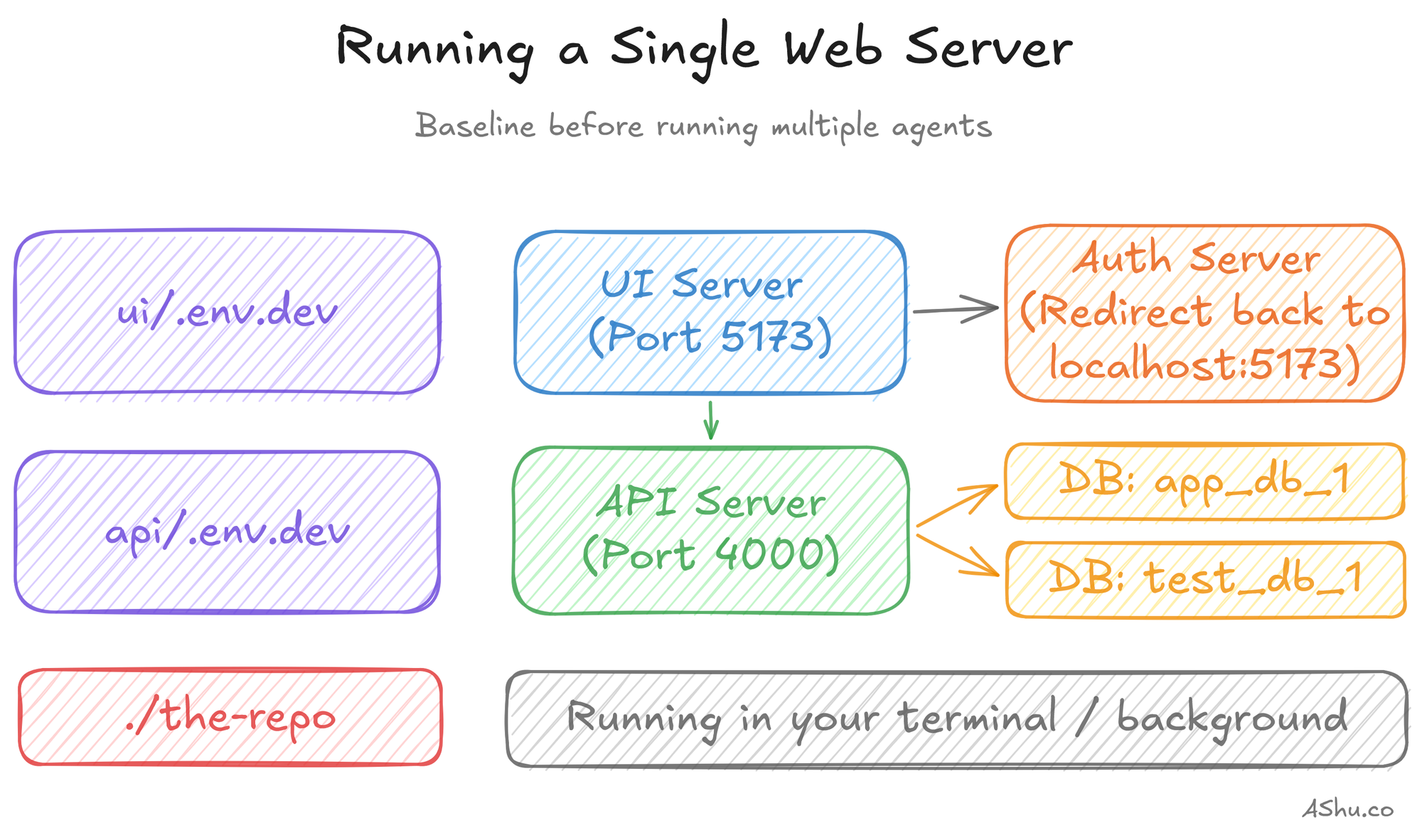
I found myself spinning up and tearing down servers, running migrations back and forth. I started thinking about how to isolate them a bit better by extracting configs into environment files, then parameterizing different ports and databases. Classic DevOps practices.
But manually managing these environment files, spinning databases up/down was untenable. I was creating and tearing down worktrees several times per day, and it's tedious to manually keep track of which ports and database names are free, copying .env files everywhere.
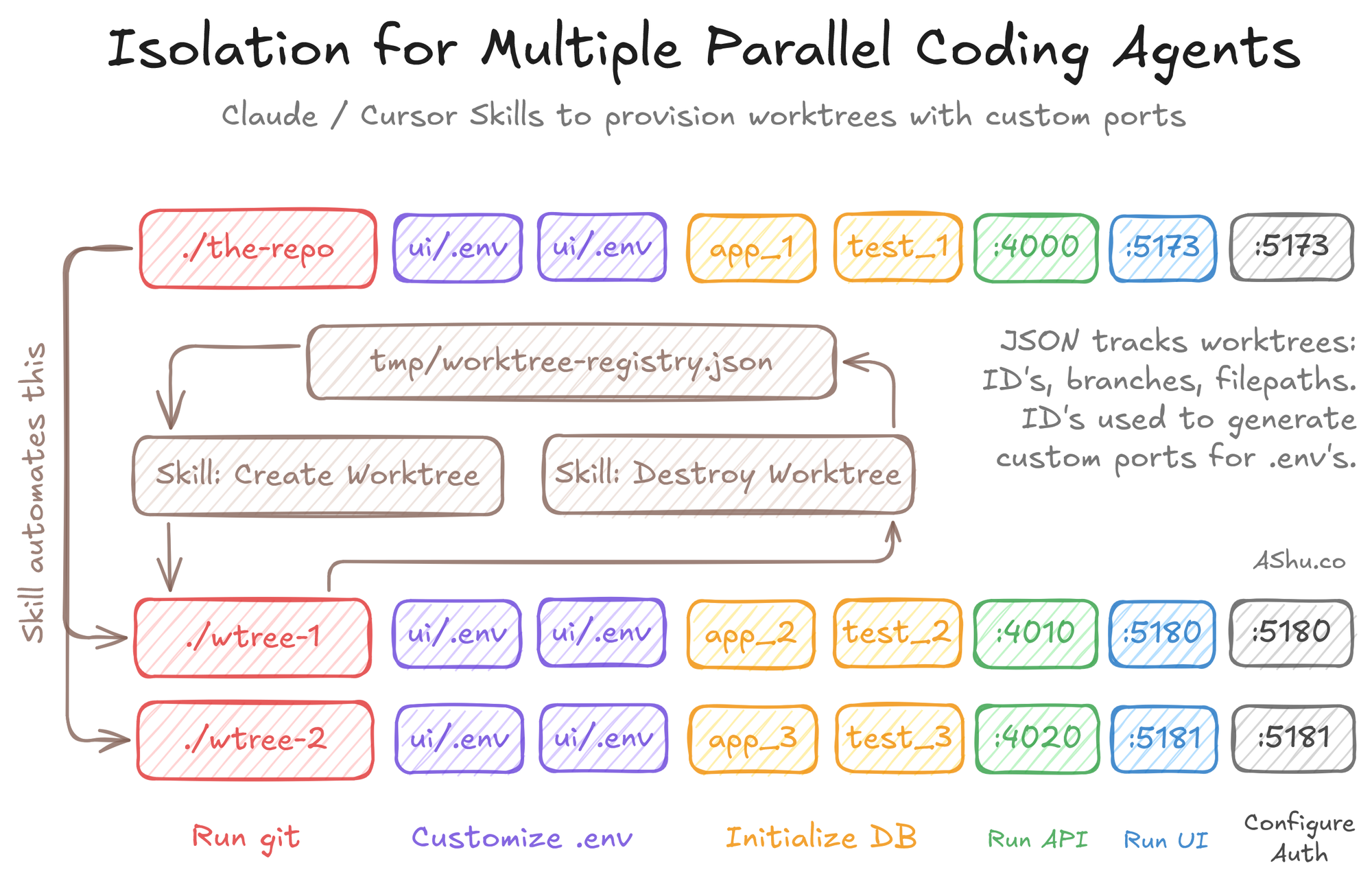
So, I wrote a few Claude Skills that wrap the underlying git worktree command: create a worktree, allocate ports, provision databases, generate .env files, install packages and register the ports/database in a central JSON file.
I've open-sourced a generic version that you can customize for your application: you can find it on Github. You'll need to customize the setup/teardown to the specifics of your environment. While I can't make it turnkey for every solution, I wanted to share the structural elements: where it runs and how it runs.
Results: from 16% to 50% with 3 parallel agents
Parallelizing coding agents was fast and straightforward: for a small application, I reconfigured my tooling in about a day. With the agent Skills I shared in Github, I was able to create a worktree and provision the environment in such a way that I could scale up the number of parallel agents to 3 and beyond.
Whereas I was stuck at 16% before, I was quickly hitting 45+% consistently. I got to the point where I started bumping up against the weekly rate limits. And I could finally see the pathway to 10 or more agents, and the need for 2 or more Max 20x subscriptions.
But in the end, it wasn't about getting to the top of a token leaderboard. Boosting my Claude Code utilization from 16% up was an exercise to ground my use of AI coding agents towards getting useful work.
It was helpful to work on a small project to exercise my software development lifecycle: planning, implementing, testing, and running on simple cloud infrastructure. What's the use of fast coding if you can't operate and troubleshoot it?
Don't feel FOMO about orchestrating 10+ parallel agents
It's important to keep our eyes on the goal: to build things people use, enjoy and get value from.
There are folks who are pushing limits and are aiming to build fleets of 10's or 100's of parallel agents. That's awesome, and I can't wait to see what abstractions and tools they create to make it useful for the rest of us.
But, I wanted to figure out the pathway to parallel agents in a grounded, lightweight way. I wanted to figure out when to parallelize, how to split up the work, and what infrastructure to set up. AI coding agents are clearly accelerating our work, but I wanted to feel the rough edges so I know how specific tools solve specific problems.
If you take one thing from this: don't start with the tooling. Start by getting your first agent fully occupied, then find an isolated task for a second. The changes you make should follow the problems you encounter.
If you want to skip the manual setup, grab the worktree bootstrap script on GitHub and customize it for your project. It handles port allocation, database creation, and env config for Rails, Phoenix, Django, and similar stacks. Check out the readme.md for instructions.
Now that I'm running 3 agents and burning tokens 3x faster, the cost comparison between Claude Code and Cursor becomes interesting again. Next up: I'm going to dig into the pricing math to answer my original question about why switching from Cursor to Claude Code seemed to drop my token usage by 64%.
This is Part 2 of my 3-part series on my experience transitioning from Cursor to Claude Code. Catch up: Part 1: Stuck at 16%. Part 3 next week.