Why I use markdown plan files instead of Cursor and Claude's built-in planning
Markdown plans help me and coding agents be more intentional. And I can control the pace of vibe coding better.

The technique that helped me jump over the threshold from "coding with AI" to actually "vibe coding" was the use of a plain markdown file. Interestingly, it wasn't Cursor's built-in planning mode, nor Claude's in-memory task lists. It was a plain markdown file, with numbered subtasks, and a breakdown of the work that needed to be done.
Early on, I stayed "hands-on" with the coding agent, because I was concerned about multi-part problems, about the AI coding agent "jumping in too soon", and that I wouldn't know how the code worked if the AI hallucinated or ran out of context (tokens). But I found that vibe coding with markdown plans meant that I had an artifact that (quickly) helped me be more intentional with design.
In this article, I'll share the prompt I put into AGENTS.md (which I've shared on Github), what worked, and what didn't. But first, I'll share some context about how I got there, because I think the path is relevant to a pattern I hear a lot of engineers get stuck in.
How I went from 'coding with AI' to actually vibe coding
I used Cursor in my work through most of 2025. I found it useful for inline prompt editing, one-off chat questions, and greenfield scripts for reporting and maintenance. But I was mostly doing single-file work. Multi-file, multi-step projects with real complexity? I'd start in Cursor, hit a hallucination or a design decision I disagreed with, and fall back to writing it by hand.
For me, it came down to a conversation with Michael Stahnke (leading engineering at Flox) at Github Universe last year. We were comparing notes on how we were using AI for coding, and he mentioned something that resonated instantly: he was structuring his work in markdown plan files. This gave me a lever of control – it let me audit a multi-part project breakdown before implementation.
From there, I was able to go from prompting the agent for each change I wanted, to taking a step back and creating a plan that I could let the AI coding agents run for hours on. This was when I truly went "hands off" and let the AI steer for itself.
Here's what I've found makes this approach work.
Benefits of a markdown plan file, for me and the AI coding agents
It gives me an artifact I can control. With a file artifact, I can find it easily in my codebase, edit it if I want to, commit it for future reference, append notes and learnings, or feed it into another system or automation. This is a subtle point, but it's the key reason why I prefer a "markdown plan" that I own, over the "planning modes" in Cursor / Claude.
It makes me and the coding agents more intentional. AI is great, but still not perfect. A markdown plan forces a quick up front research phase where I can identify gaps in understanding, and areas I may disagree with. It also forces me to roughly understand what's being built. Even as things become more autonomous, it's still important to understand what you own – even if it's at a higher level and across many more systems.
I can control the pace better. I can pause the AI to ask questions, I can rewind to a previous state (in git and the plan file), skip around tactically, I can adapt the plan as we discover new information, or go fully hands-free. The goal is to increase autonomy and parallelism, but having a file with clearly numbered and grouped tasks lets me communicate about and manage chunks of work. This can be extended by pointing multiple agents at different phases of the same plan.
It gives me more options in managing my conversation's context windows. Since agents lose efficacy as their context windows fill up, different people have different preferences in how often they "reset" the agent. Some prefer 50% usage, 90% usage, or some people are OK with "infinite-ish conversation" compaction. In any case, having a markdown plan with task status, a work log, and git commits gives you the option to clear the conversation any time.
A plan file gives me a place to deposit learnings, error messages and TODO's. This is more of a documentation step. But as I interact with the agent, there are times where it encounters an error message, or a design decision that I want to remember or revisit later, I like to log it for later. Since I always archive my plan files instead of deleting, I plan to use this as a work journal where I can come back and ask questions like "what tech debt have I accumulated"? This covers a gap in knowledge, because it's not contained in code or commit messages.
I can automate post-implementation steps as a Cursor / Claude Skill. Cursor Skills and Claude Skills both support reusable "prompt actions" - you can think of them as natural language scripts. When everything in the plan is done, I need to delete or archive the plan to a different folder. I've noticed that this is a natural point to run a Skill to review the code and look for opportunities to improve: security, testing, documentation, and code factoring.
Markdown plan file best practices for Claude Code, Cursor, etc.
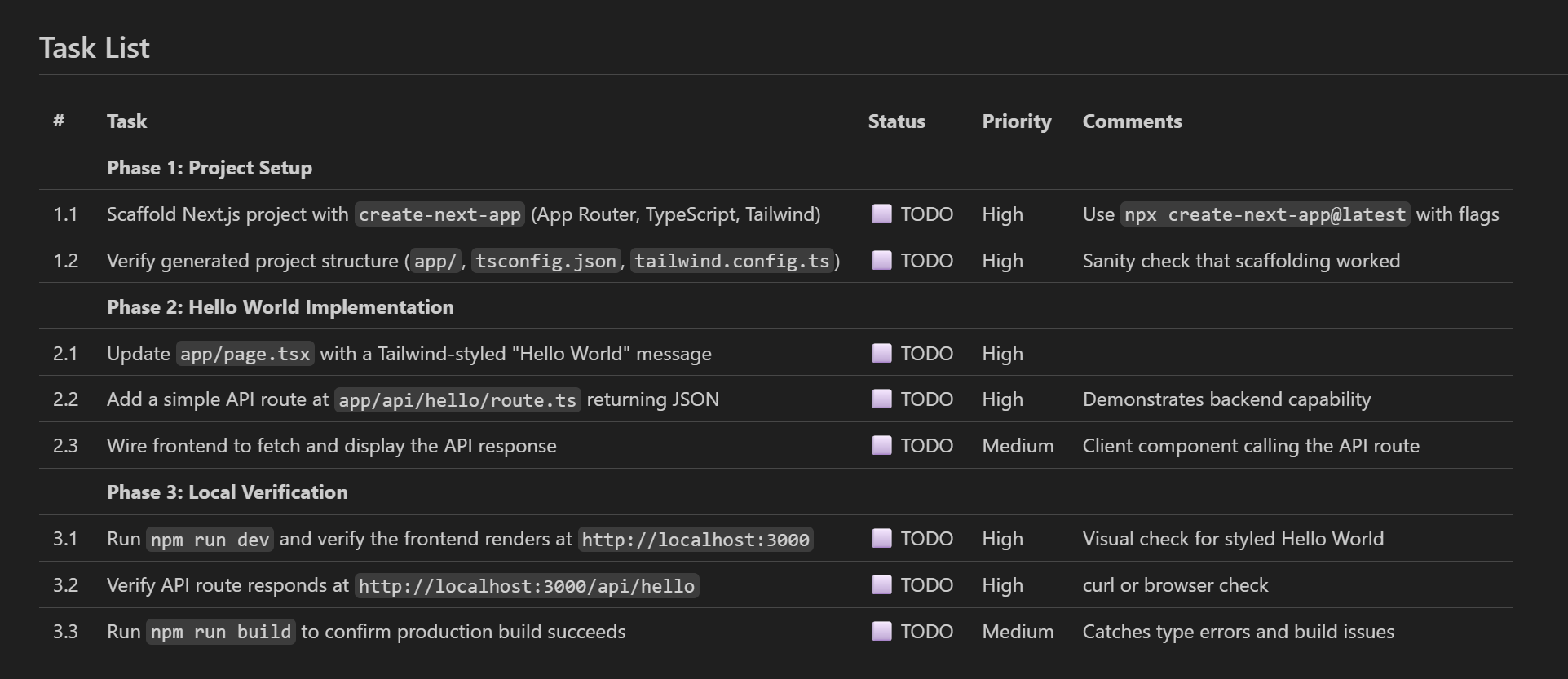
I've put my plan prompt on Github (markdown plan prompt / rule), and you can read an example of a markdown plan for creating a simple "hello world" Rails server.
Header: a quick summary of the plan
I like to have a few lines at the top that summarize what this plan file contains: title, date, objective, and references to any "child" or "related" plans. I "spin off" and "split" big plans into child plans, and I find it useful for the "child plans" to reference the "parent plan", and vice versa.
Task List: the focal point for the implementation
Near the top of the plan, I like to have a consistently structured, markdown table of tasks. This is the focal point of the plan that serves as a backlog that sequences and organizes work. Since AI is often inconsistent about formatting, and the structure of the task list is important to my workflow, I've made it a point to specify structure concretely:
- I like this markdown table to have these 5 columns: #, task, status, priority, comments
- All tasks are numbered, so I can tell the AI things like "Do 1.1 - 1.3 but skip 1.4"
- Tasks are grouped into "phases", so I can tell the AI things like "do phase 3 first"
- I find that using emojis like "✅ Completed" helps me visualize status better for larger lists
Task Breakdown: a design doc to review
This functions like a design doc - I like to audit this BEFORE implementation. It's usually accurate, so it's mostly to catch the occasional issue and to improve my understanding.
Work log: a journal of errors, problems and learnings
This is a dropoff location where I ask the AI to deposit error messages, design decisions and tradeoffs, so I can reference them later. When I run a Claude skill to "close up my plan", I have hooks that will reflect on problems described in the work log. I want to be able to query for exact error messages so I can document it later.
TODO section: accumulating ideas that don't impact scope
Regularly in my work, I have to make tradeoffs and tell the AI that "this is outside scope", but "log it for later". So I tell the AI "save a todo to do XYZ", and the TODO's are stored here. Since I like to archive my plans (in git, or Obsidian), you can query old plans belatedly to extract TODO's relating to "Github actions", for example.
What didn't work: hand-written plans, long AGENTS.md files
I often find it helpful to read what people tried, but didn't work. So here's a few things that I tried:
Write the plan files by hand. When I started out, I would hand-write a plan. Very quickly, I realized that this time-consuming process could and should be done by the AI. I see and talk to engineers doing this, and I think this is a common misconception: use a short plan, and let the AI coding agent flesh out the plan.
Estimate and document "effort" and "risk", to influence the agent to behave differently. I thought this would change its behavior so it would scale up rigor / safety up or down. But in the end, I've seen no evidence of this. And its estimates of effort and risk were incredibly inaccurate.
A long planning guideline for AGENTS.md. The naive version of this planning guidelines accumulated to be long -- because I had the AI add instructions every time I was annoyed at something, it grew to 130 lines with a nearly full example. I've since condensed it to one that's around 35 lines, and it's productively good.
Having no planning guideline, and just telling the agent to "create a md plan". It was usually correct, but it was inconsistent. I depend on the task list being near the top, and having it structured in a certain way.
Telling the agent to "create a plan", and assuming it would follow the AGENTS.md. I have to explicitly say "create a markdown plan", and sometimes "create a md plan according to guidelines".
Counterpoint: why markdown plans may not be for everyone
Before I close, I should note that this technique may not be for everyone.
For starters, Claude and Cursor's Planning Mode is actually pretty solid. I think it works for many / most cases, and is simpler to use. It's time consuming to wait for a plan, review it, and simply implement it again. Also, you may get a lot of plans that you simply agree with and are OK to get going. If this is the case, you may as well have the AI jump straight into implementation and review the output at the end.
And as engineers seek more parallel agents and longer running autonomous agents, they may have to re-evaluate markdown plans. Maybe markdown plans aren't scalable enough, or are too freeform. For example, you can look at Steve Yegge's beads project, as products in issue tracking. (I haven't tried it, but I'd like to.) I believe the idea is that a more structured workflow will boost clarity, performance and understanding, especially for "totally autonomous agent teams" like his Gastown project.
There are other philosophies worth exploring. The Ralph Wiggum loop, created by Geoffrey Huntley, takes a different approach entirely: instead of planning across a long session, it runs the agent in a bash loop with fresh context each iteration. Progress lives in files and git, not in the agent's memory, so it avoids "context rot".
Another philosophy: Spec-driven development (with tools like GitHub Spec Kit and AWS's Kiro) goes further on the planning axis — writing detailed specifications with acceptance criteria before any code generation, so the spec itself becomes the source of truth.
My markdown plans sit somewhere in between: more structured than a Ralph loop prompt, lighter than a full SDD spec.
Closing thoughts: markdown plans are medium weight, and that's the point
This may seem like a heavyweight process, but in reality it's pretty quick. For starters, it's not meant for truly lightweight, one-shot prompts. I primarily use it for larger, multi-hour runs where I want to reduce the likelihood of poor quality work.
To reference a recently common saying that "with vibe coding, all engineers become managers", I think a markdown plan is basically like a manager or a tech lead asking a teammember to do a bit of researching, project planning and designing things. The complexity and time spent should be scaled up or down depending on complexity and urgency.
I should also add that I'm open to moving beyond markdown plans, and I don't think this is necessarily the end state of project planning. Specifically what I care about it is:
- Taking a small amount of time to do some planning that I can iterate on as things change
- Having good task management: task identification, descriptions, explanations, groupings
- Having an artifact that I can control, integrate with and automate around
If you're using markdown plans or have a different approach to keeping agents on track for longer projects, I'd like to hear about it — DM me on LinkedIn or on X.